Sunday, December 27, 2009

Archiving Gmail

I've had enough problems with losing data "in the cloud" that I know not to think my data is safe anywhere but mirrored to multiple hard drives in my home or business... and even there you have to remember nothing is really ever totally safe (man, I sound paranoid).

My first experience with losing important communique material was back in 1999 when Microsoft decided to completely delete my Hotmail account for no apparent reason.  It was a personal account that I used on a weekly basis, and NEVER sent out any mass e-mails.  Yet one day I went to log in, and the account was simply gone.  Any time I tried to contact Microsoft about the issue, they told me they wouldn't even talk to me if I didn't have access to the address in question.  Since they had terminated or lost the account, I obviously couldn't use it to communicate with them.  But since it HAD been a legitimate account at one time, I couldn't created another account with that name.  In other words, Hotmail just completely fucked me and then walked away.  Nice.

So I learned the hard way to never trust that your data is safe with a third party.  I've never lost any data with Google, but I know people have, and there have been times when Gmail has been down long enough to make me start worrying.

Thus, the need to download (backup/archive) all my e-mail messages from Google.

There are two Firefox plug-ins that look good at first: Gmail Backup and Gmail Keeper.  However, both are written by individuals, one in the Czech Republic and one in China.  Call me paranoid again, but since downloading and archiving your files requires entering your Gmail user/pass, I'm going to pass on this option.

Recently, there came a new player to the realm of Gmail backup.  A company called Backupify has introduced a service that will download all of your precious data from online services like Flickr, Facebook, Twitter, Google Docs, Blogger, Wordpress, Hotmail, etc...  They seem to be on the up and up, they have a service hotline listed on their front page, and from all evidence they seem to be a legitimate and secure option (albeit still a third party).  However, within the first two weeks of launching the service, Gmail started viewing the onslaught of downloading as an attack, and blocked the service from accessing material on their servers (and forced many Gmail account holders to reset their passwords).  Backupify has since been in dialogue with Google, and it looks like Google is being extremely cooperative with helping them get their service back on line (the simple fix is apparently setting a "slower drain" on the data), but as of this writing, the Gmail section of Backupify still states: "temporarily disabled," and I need something that will work NOW.

So the simplest method for backing up e-mail is obviously just setting up an e-mail program to download my mail, so that it is stored locally, and then backing up those files.  This requires an e-mail program and making sure everything is set up just right.

I used to use Eudora, because that's what the University I attended had on all their computers.  My oldest e-mails exist on a hard drive somewhere in Eudora format.  Later I switched to Thunderbird, but didn't really like the interface, and thus became satisfied with just using Gmail (it's all I've been using for the past five years).  Obviously, this has it's own problems (data is all stored in the cloud, and if you can't get on line or if Google's servers are down --it happens more often than you'd think, you're screwed).

Outlook has always seemed like the WORST option, as MS had a policiy of keeping such an insane choke-hold on their programs.  However, with Google getting so much good press (and money) for appearing "benevolent," MS has glommed onto the idea of actually making things easier for everyone (whodathunk?!) for "free."  They've gone through a couple incarnations of a free mail program over the past five years (some of them were awful), but I think they've finally got it.  Windows Live Mail integrates nicely into Windows 7, and also cooperates well with Windows Live (an online service like Gmail that I use to store all my contacts, as it syncs superbly with my WinMo phone).

So I created POP accounts for any e-mail address that I've ever used with Gmail.  I prefer POP to IMAP because I want to make sure that my messages stay "as is" in my Gmail account.  IMAP can be extremely useful, but it can also cause problems, in that it makes changes to your server when you alter things from your E-mail Program.  Since I'm only doing this to back up my online messages, POP is the better choice.

Windows Live Mail will only download the e-mail of a single address.  Since I have multiple e-mail personalities that all forward to my Gmail account (daniel@, info@, web@, not to mention multiple domains), I first saw this as a problem.  I wanted to simply download ALL the e-mails stored in my Gmail account.  But I'm going to go ahead and view this "problem" as a bonus, in that all my e-mails are grouped according to the e-mail address to which they were addressed (or by which they were authored).  It's kind of a pain in the ass setting up twenty separate accounts, but in the end, I supposed it's nice having everything compartmentalized.

The final step in downloading everything from Gmail in order to create a back up all of your online messages is to go into your Gmail settings and make sure you select "Enable POP for all mail (even mail that's already been downloaded)" from the "Forwarding and POP/IMAP" tab.


[UPDATE]  It would seem that though you have to enter every e-mail address you've ever associated with your Gmail account to make sure you download all your e-mails, Windows Live Mail doesn't necessarily download messages to the correct corresponding account.  For instance, e-mail for my "daniel" account was often downloaded to the "music" account, etc.  I have no idea why this is happening (I carefully studied the message headers, and they don't seem to have ANY correlation), but since my ultimate goal is just making sure ALL my e-mail is backed up to a local hard drive, I'm not going to worry about it too much right now.  And I can still search "all e-mail" to find things, so I suppose it's not incredibly critical where each message is being stored.

...

Using Windows Live Writer

Oh, wow this makes things easier!

If there's one gripe I have about Blogger, it's how difficult it is to see what your post is going to look like when you hit publish (their web preview does not show your backgrounds, columns, etc.).

The only thing I wish Live Writer had was a function to download your formatting options from your template's css styles, so you could just use your css options from the drop down menu that allows you to choose heading 1, 2, 3, etc. and paragraph.

With Windows Live Writer, you can compose blog entries that look like they'll end up looking as you type them.

Very nice.

I'm looking forward to posting this and seeing how the post looks online.

[EDIT] Perfect!  I'm loving Windows Live Writer!  It's also great to be able to compose a blog post while offline (say, while on a transatlantic flight), and then post it when you have connectivity again.

...

Tuesday, December 22, 2009

Solution to Problem Pairing Bluetooth Device to Windows 7 (or Vista)

I am in the process of setting up my Omnia to act as a remote control (via Bluetooth) with Windows Media Center (more importantly, Hulu desktop plugged into Media Center).

I was having a HECK of a time pairing my device to my computer (Windows 7). Always there was a "bang" and when I would have Windows 7 troubleshoot the device, it couldn't come up with an answer.

I finally found the solution in a post by Rajiv Singh Suwal (Computer Engineer / Senior Software Architect). Thank you, Mr. Suwal.

  1. Make sure Windows Mobile Device Center is installed on your computer. If it's not, you can download it from here.
  2. Right click on "computer" in your start menu to access the Device Manager.
  3. There will be an "Unknown Device" named "Bluetooth Peripheral Device" with a "bang" on it (exclamation point).
  4. Right-Click "Bluetooth Peripheral Device" and click on "Update Driver Software."
  5. Click "Browse My Computer for Driver Software" button.
  6. Click "Let Me Pick from a List of Device Drivers on my computer".
  7. Select "Bluetooth Radio" from the list. In the Company List choose "Microsoft Corporation" (not just Microsoft).
  8. From the drivers list there may be one or more drivers with the name "Windows Mobile-Based Device Support" with different driver versions. Select the most recent.
  9. Ignore the warnings about the driver not being trusted (hilarious, or perhaps telling, that Windows 7 doesn't trust drivers from MICROSOFT) and jump through the hoops.
  10. Now "Device Manager'" should display "Windows Mobile-based device support"when you click on "Bluetooth Radios."
  11. You may need to remove the device in your Bluetooth panel and then reinstall it. You may also need to restart your computer.


Worked like a charm for me! This should work for iPhones, WinMo devices and Android phones, 'cause it's all about the Bluetooth.

Sunday, December 20, 2009

DO NOT install Broadcom's bluetooth driver software update to Windows 7

I was messing with syncing my Omnia to my laptop via Bluetooth, and my MSI Bluetooth dongle didn't seem to be working properly. I decided to download and install the update from Broadcom's site.

Everything seemed to be going well, until...

Suddenly my machine seemed to be possessed. I watched in horror as the icons from my desktop started disappearing. An error popped up saying the install couldn't find the cab file it needed. The popup dialog said I needed to verify that the file existed. I looked, and the file DIDN'T exist. I was offered no help and no alternatives. The only two choices were find the file (that didn't exist) or cancel. So I canceled, and then the computer completely crapped out. When I went to reboot, the machine told me I was fucked.

I am currently trying to repair via a restore point with my Windows 7 disk, but I'm pretty freaking unhappy about this.

On top of this mess, the whole "deleting icons from the desktop" thing REALLY FUCKED ME, because it deleted files from my Microsoft Mesh environment. How in the world does a driver update ERASE YOUR DATA?! I am worried that I am not going to be able to recover some EXTREMELY important files that this "update" deleted from my Live Mesh folders (stupid me for thinking something "in the cloud" was safe --I thought because it was synced to three computers I was OK, but since those computers were all on when this happened, Mesh "synced" them by deleting all the files that were erased from my laptop).

So... DO NOT install the Bluetooth driver/software update from Broadcom's website. It will KILL your computer. Thanks, Broadcom. You suck. Bad.

[UPDATE] This is much worse than I'd thought. Not only is my machine completely out of commission, but when I plugged the system hard drive into another machine to simply retrieve my data before having to do a complete new OS (and all programs) install, I found that the VAST MAJORITY of my data has been wiped clean. Music folder, Pictures folder, Videos folder, Documents folder... all GONE.

I would say that the file SetupBtwDownloadSE.exe hosted on the Broadcom site is a virus, not a Bluetooth driver update.

I'm not sure how Broadcom can defend hosting a file that will completely destroy your computer and all your data, especially when they are purporting that it is a Bluetooth driver update. I am astounded (and at a total loss).

...

Tuesday, December 15, 2009

The Temper Trap "Conditions"

Every so often, I hear a song and like it enough to check out the album. Even less often, I check out the album and like it enough to make the purchase.

I just downloaded Conditions by The Temper Trap after hearing "Sweet Disposition" on the Glass Note label web page while looking for contact information for getting a sync/master license for a Phoenix song for our movie.

Being label mates with Phoenix is definitely a good first sign. They've got a similar "driving pop" vibe that I really dig. They've also got a little Snow Patrol (listen to "Fader") and Arcade Fire (listen to "Down River") action going on. They've definitely got a good deal of 80's influence ("Sweet Disposition" could have easily been on a When In Rome album --there's even a little Big Country, early U2 and Dream Academy spilling from various rifts in the album's space/time continuum).

The latter half of the album ("Soldier On," "Fools," etc.) leaves me with a kind of Coldplay meets the Bee Gees feeling that prevents me from giving the album a full "run out and buy it NOW" recommendation, which is not to say that I don't like what I'm hearing. I just don't feel as strongly about recommending it (though I do love hearing what it would sound like if Jose Gonzalez got together with The Killers to make a pop album, especially on "Resurrection").

After several listens, I still feel comfortable with a strong: if you haven't heard these guys, I definitely recommend you check them out.

...

Thursday, October 22, 2009

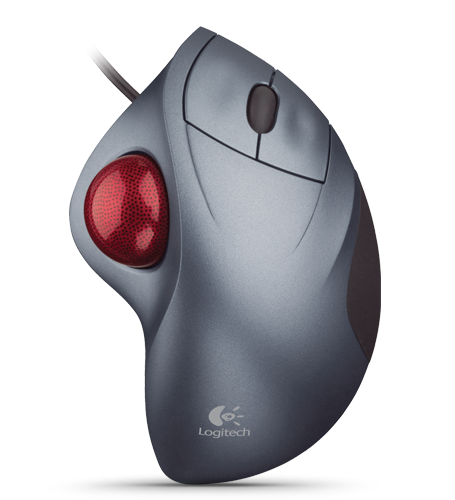
Logitech TrackMan Wheel Review

In my constant quest for the perfect combination of equipment to alleviate the pain, and to set me further on the path of actually becoming a robot (able to sit in front of a computer for 16+ hours a day), I've tried all kinds of different input devices.

I've been using the ZeroTension Mouse for quite some time, and while it has all but eliminated my ulnar nerve strain and the pain in my wrist and elbow (by allowing me to rotate my hand to a vertical position where it should be, vs. flat like most mice require), the sheer size of the device forces me to hold my arm too far out to the side of my keyboard, and thus the pain in my shoulder has increased.

I've finally decided to give a trackball a shot.

So far, I love it. I went with the Logitech TrackMan Wheel (corded... the cordless version seemed a waste, and the wireless dongle that plugs into your computer is huge). You have to clean the ball bearings that "float" the track ball every week or so (extremely easy), but the precision is great (though I still use a tablet for drawing and extreme precision), and I love not having to move the device around (it's stationary and the ball moves).

It took about an hour to get used to (I kept trying to move the whole thing [blush]), but now it's fantastic. I love how little desk real estate is quires.

I was also a little worried about pain in my thumb joints from the constant, repetitive motion, but I've been using it for a little over three weeks, and I haven't noticed any pain there at all.

It took me a while to decide between the devices that utilize the thumb and the devices that utilize finger movement. From back in my "regular mouse" days, I remember the excruciating pain in my hand from constantly turning a scroll wheel with my middle finger. I assume the trackballs that utilize finger movement would produce a similar effect, so I went with the thumb ball. Even now, I feel the growing pain from using a scroll wheel with my middle finger again, and I have to be diligent about actually clicking the scroll wheel down like a button to activate using the ball to scroll (I wish I could disable the wheel's ability to scroll, and use it ONLY as a button, but that doesn't seem to be an option).

My one gripe is that the device still positions my hand too flat (thus creating that ulnar nerve strain again). There is some slope to the device, that places your hand a little less flat, but it's still too much. Thus, I've been working on a solution to tip the device up to get it more vertical (so that the ball is almost directly on top, with the buttons on the side and the side of your hand resting on the table, like the crappy picture to the left).

I tried a couple of different wedges fashioned out of Sculpy, but they were pretty garish. I also tried a giant wad of Silly Putty, and while it's the best thing so far, it tends to flatten out over time. I even thought about cutting off the right edge of the TrackMan Wheel to create a new planar surface (though not enough surface), but I think the best solution is probably going to be creating a wedge out of a block of wood and then maybe trying to integrate it into the side of my keyboard somehow (after I cut the number pad off so my arm isn't stretched out so far).

All of this nonsense could be easily eliminated if Logitech simply built the thing correctly in the first place, with the ball on top and the buttons on the side. Your hand would be in a zero tension position, and all would be right with the world.

...

Wednesday, October 21, 2009

Streamlining "Back to Normal" from a Hard Reset

So I'm really getting the "back to normal" from a hard reset down to a science.

A couple of days ago I spent three hours on the phone with Verizon trying to figure out why my phone hadn't been able to receive data for three days. I finally gave up on them and did a hard reset. This always means starting from ground zero and having to reinstall everything, so I decided to make some changes to streamline the process. ***As an aside, I'm wondering if the reason I lost data transmission/receive capability was a conflict between the WiFi tethering software and the new Omnia ROM.

I now have a folder on my "My Storage" that contains the cabs of everything I reinstall when I do a hard reset (SPB Mobile Shell, Total Commander, Torch Button, Google Maps and Audio Notes Touch). Since a hard reset doesn't wipe the My Storage (or SD Card), those files are always there and ready when I need to start over. I also realized that the new Omnia i910 ROM already contains Windows Live, so there's no need to install that in order to sync my contacts (very nice).

I don't have this perfected yet, but there are some good programs like CERegEditor that will not only allow you to edit your registry via your computer, but they will also allow you to save your changes in configuration files and thus simply click a button to make all the saved changes (disable Keyboard auto deploy, make the vertical scroll bar wider).

If only there was some way to have the phone automatically:
  1. re-associate all the photos and ringtones for my contacts
  2. change the thread_sms.htm file so that the Text Composition area has a reasonable amount of space
  3. set up my exchange server to sync Google Calendars (7 of them) using NuevaSync.com
  4. Reload all my RSS feeds and Podcasts
  5. Change setting for phone dial lock to off
...