note: as mentioned before, I tend to talk a lot, so if you're looking for the "nitty gritty," skip about half way down this thread to where I actually start talking about my network device research; apologies to those annoyed by the "human parts" of this review/post
Whenever I think about purchasing a new gadget, I send out a call to nerds. Which is to say, I type "Nerd List" into Gmail, and it populates an e-mail with a list of my geekiest friends. The next week to ten days is a constant barrage of "reply to all" messages. Their counsel is invaluable. But it was only after my last two week volley regarding home networking that I realized (duh) that I was playing Microsoft/Mac to the open-source rebels and heroes of the world. The information compiled needed to be shared, so here it is.
The issue started with the fact that I need a new wi-fi router. I've got a
Belkin F5D7230-4 that was likely made by Al Gore in a garage. It's so old, that when you look it up on Belkin's site, the picture they show of the unit is a completely different form factor than the one I have. I must have purchased the first one available.
To blow my own horn (and perhaps lend some credibility to this post), most tech purchases I make last a long, long time, because I usually research and make sure I purchase the best thing available (without breaking the bank). My first major computer purchase out of college was a
Micron PII that was my main machine for nearly 10 years. In fact, the only reason it was decommissioned was because I moved from the tower form factor to rack mount machines.
Anyway, I need a new wireless router. My Belkin
is actually a "G" router, so I guess it's not
that old, but I'm sure it was one of the first units to utilize "G." However, it's not gigabit, and I'm transferring way too much data these days (editing film footage) to live without gigabit. Not to mention my wife is constantly plagued by slow wi-fi transfer speeds to her MacBook Pro.
So I started thinking about what we really needed/wanted for out household.
A lot of people leave their computers running 24/7. I have never been able to bring myself to do this. First of all, I've been a PC guy ever since I graduated from college, and in my experience PC's just tend to "gunk up" if they don't get a reboot purge on a fairly regular basis (which is to say: I've experienced "lock-up" far more often when leaving a machine running 24-7 than when shutting down every night). That and the fact that leaving two computers running constantly is like having an extra refrigerator in the house, as far as energy consumption goes, have made me a firm believer in shutting down the computer.
I do have a 5TB RAID server, but when I shut it down, my wife no longer has access to data backup, media streaming (from the media server) or even a printer (networked via that computer). Not to mention I don't necessarily want that RAID server being accessed by anyone other than me...
ever. There's just too much opportunity to screw up back-ups and critical data.
Media streaming is something that we aren't currently utilizing too heavily (the occasional mp3 files), but I imagine the idea will factor heavily into any new system we start utilizing in the very near future (whole house audio streaming music from a central location, bedroom and living room televisions accessing a central movie repository, etc.). So what I really need is something that would allow me to have constant wi-fi access to a hard drive (for back-up and media streaming) and a printer.
There are a few wi-fi routers out there sporting a USB connection, which addresses the networked printer and storage issues. But, my search was easily narrowed by the fact that "N" is the new "G," and I'm not going to purchase a wi-fi router that doesn't utilize "N."
The tricky part here, however, is that "N" has been developed to run on both 2.4Ghz and 5Ghz frequencies, and when all is said and done, the "golden standard" will be the 5Ghz band, as it offers far more than the ll channels possible with the 2.4Ghz frequency.
There are a few front-runners in the catagory of Gigabit cabaple Wifi Routers utilizing "N," but not very many that tout both "N" frequencies.

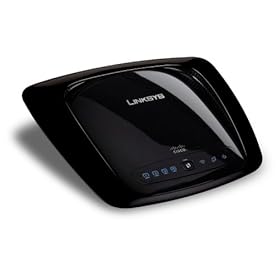
A wi-fi router that kept coming up in my searches for it's great range (signal strength compared to distance from unit) was the
Linksys WRT160N, but it has no USB port for networking a printer or external hard drive, so it was immediately off my list. Plus, many reviews spoke of problems, especially with a Mac, in regard to properly utilizing the dual-band draft N technology. Not to mention it looks a little like a pile of Darth Vader poo.
11/21/08 Note: change the letters around only
slightly (WRT610N) and you get the same unit WITH the network USB drive option. Who's the dumbass that names these things? The CNET reviews for this device make me think this could be a clear winner, were it not for the fact that they blatantly state that the USB port
will not work with printers.
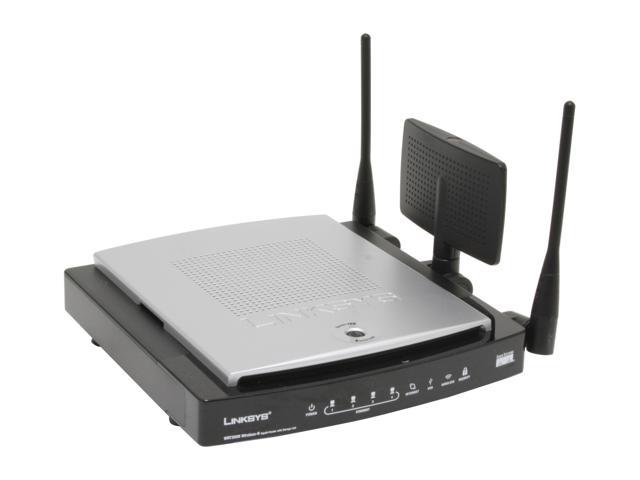
 Linksys WRT350N |

D-Link DIR-655
|
The two routers that became the forerunners in my search were the
Linksys WRT350N (around $129) and the
D-Link DIR-655 (around $99). Aside from the fact that the Linksys looks like something put together by an alien trying to phone home (it's super-fugly, people), it seemed to be getting much worse reviews than the D-Link (which actually has quite a few fans, despite the fact that it doesn't utilize the 5Ghz frequncy), so I think I'll end up going with the D-Link. To be fair, Linksys has since released the "WRT600n," but I haven't been able to find any credible sources for a decent review, and it's nearly $80 more than the D-Link (and the 350N, for that matter). Also, it should be noted that most people with the Linksys WRT350N running
DD-WRT have been extremely happy with the results (though I'm not sure that DD-WRT addresses USB functionality).
NOTE: upon going to print, I realized D-Link has released the
DIR-825 and the
DIR-855. At $290 (currently $265 at NewEgg), the 855 is
way out of the running, but the 825 is only $129 and offers all the glories of the 655 (namely, a USB port), but with
dual-band "N." Additionally, many of the reviewers seem to be utilizing the dual-band N to great advantage... assigning certain devices to the 2.4Ghz frequency while assigning other devices to the 5Ghz so that there is no sharing conflict for the N connection.
The USB port on a network device is the thing that has most intrigued me during this search, and ended up being the deal-breaker on several otherwise extremely capable WiFi Routers. I don't want to buy a new network capable printer (I'm quite pleased with my Canon MP810), so I really need to find a router (or some other device) that allows me to hook my current USB printer into the network without having to pass through an actual computer.
BE CAREFUL when looking for this feature. Some routers will have the USB port, but not "allow" it to function to it's full capacity. When looking at a Belkin router at Circuit City, I noted that one actually stated on the box: "USB port will not work with a printer." Just a heads up.
That said, Belkin is also one of only two manufactures that seem to be addressing the Network USB Hub niche. The
BELKIN F5L009 Wireless Network USB Hub plugs into your network router via ethernet cable to give you access to 4 USB ports via your network. The device has received great reviews from users and tech sites alike, but it's worth mentioning that many people have been deceived (and pissed off) by the object's title (note the word "wireless"), as the unit is NOT wirless; it only functions in
tandem with your current wireless router. So I would still be left having to purchase a new router in addition to this, admittedly cool, unit.
The only other manufacturer addressing the network USB hub market seems to be
Tritton (who incidentally make the best USB speaker deal going, according to MacWorld.com) with the
TRI-US100, but I couldn't find any reviews for the device.
NOTE: most devices with a USB port for the network will only allow one user to connect to the USB device at a time. In other words, if I wanted to print while my wife is printing, I would have to wait to even queue my print job. Also, if someone was watching T.V. and streaming from the media server, no other computer could access the USB networked hard drive. I believe this is true with all devices mentioned in this post, including the dedicated USB hubs listed above (which seems like a major short-coming of a "hub"). For this reason, I have made the decision to utilize the dedicated USB port on my new WiFi router
only for a printer server. Networked drive storage will be obtained via ethernet with a hard drive enclosure that allows connection to the network via a direct ethernet (RJ45) connection to the router. (So now I have to start researching network drive enclosures).

LaCie makes an actual network drive that almost made me click "buy." The
LaCie 301389U offers 1TB of drive space that can be connected directly to your Wi-Fi router via an RJ45 (ethernet) cable. Additionally, it has a USB port that allows you to connect additional storage or (in my case) a printer. Not to mention it is easily one of the coolest looking external drives on the market (extremely hard edges, all black, blue glow on the underside). The device also gets stellar reviews, especially in regard to ease of setup (which is the most common complaint I find with networked drives).
My main reason for
not purchasing the LaCie drive is that I would still be without a new WiFi router. It's a great hard drive and it offers the USB port for networking the printer, but I need another hard drive like I need a hole in the head.
So in the end, I'm going with the
D-Link DIR-655 DIR-825, hooking up a network printer via the router's USB port, and purchasing an enclosure for one of my existing
thousand hard drives to hook into the network via ethernet for "constant access" back-ups and media streaming.
I should probably point out, one of my friends who works for the devil (Microsoft) did mention Windows Home Server (to the rigorous agreement of several nerd voices), but as mentioned previously, I'm looking for a solution with low energy consumption that allows me to leave a drive (for media and back up) and a printer "live" on the network at all times.
Also, I know there will be several Mac fans out there to mention the
Time Capsule, but I don't like being locked into (and paying a premium for --$299) the onboard dedicated hard drive. The
Airport Extreme does have all my requirements (usb port, gigabit, dual-band wireless "n"), but I'm not about to start using Mac devices (more expensive at $174, less room for future expansion/changes), not to mention they short you an ethernet port (only has 3 instead of the standard 4).
Please post your opinions and advice, especially as this issue is addressed more and more as people start utilizing networks for media streaming, multiple computer data back up and print sharing in their homes.
11/21/08 (later in the day): upon re-reading the CNET reviews for the D-Link DIR-655 and the D-Link DIR-825 I'm considering switching my decision back to the DIR-655 (based mostly on the speed tests). In mixed mode (b/g with n) the 825 shows an abysmal 40Mbps throughput, while the 655 exceeds 77Mbps. Additionaly, the 825's top (for it's self) performing 5Ghz N only hits 102 Mbps (2.4GHz only 70Mbps) while the 655's 2.4GHz N hits
112Mbps! We don't have cordless phones in our home, and the nearest house is more than 500 meters away, so we probably aren't going to run into much trouble utilizing only the 2.4GHz frequency. Reviews also state that upping to the 855 might be worth (for speed and range) the extra $130, though I'm not so sure at this point. I just don't think I want to spend $265 on a router. So now I'm left deciding how badly I really need 5GHz N (especially if it's
slower on this unit anyway).
 I was a little surprised by the lack of "awesome tech" unleashed this year for Xmas. Usually November means the onslaught of more new tech goodies than you can shake a stick at, especially in the cell phone arena. I was particularly interested this year, because my Verizon contract is up in January and I've been considering the jump to AT&T to finally enjoy all the glories of the coveted iPhone. I was even given "permission" by the Queen on my birthday this year ("yes, you can get an iPhone" --she even made me a temporary placeholder out of an apple and a chocolate candy eye --apple eye phone, get it?).